
Containers, surfaces and inventory
Create a container
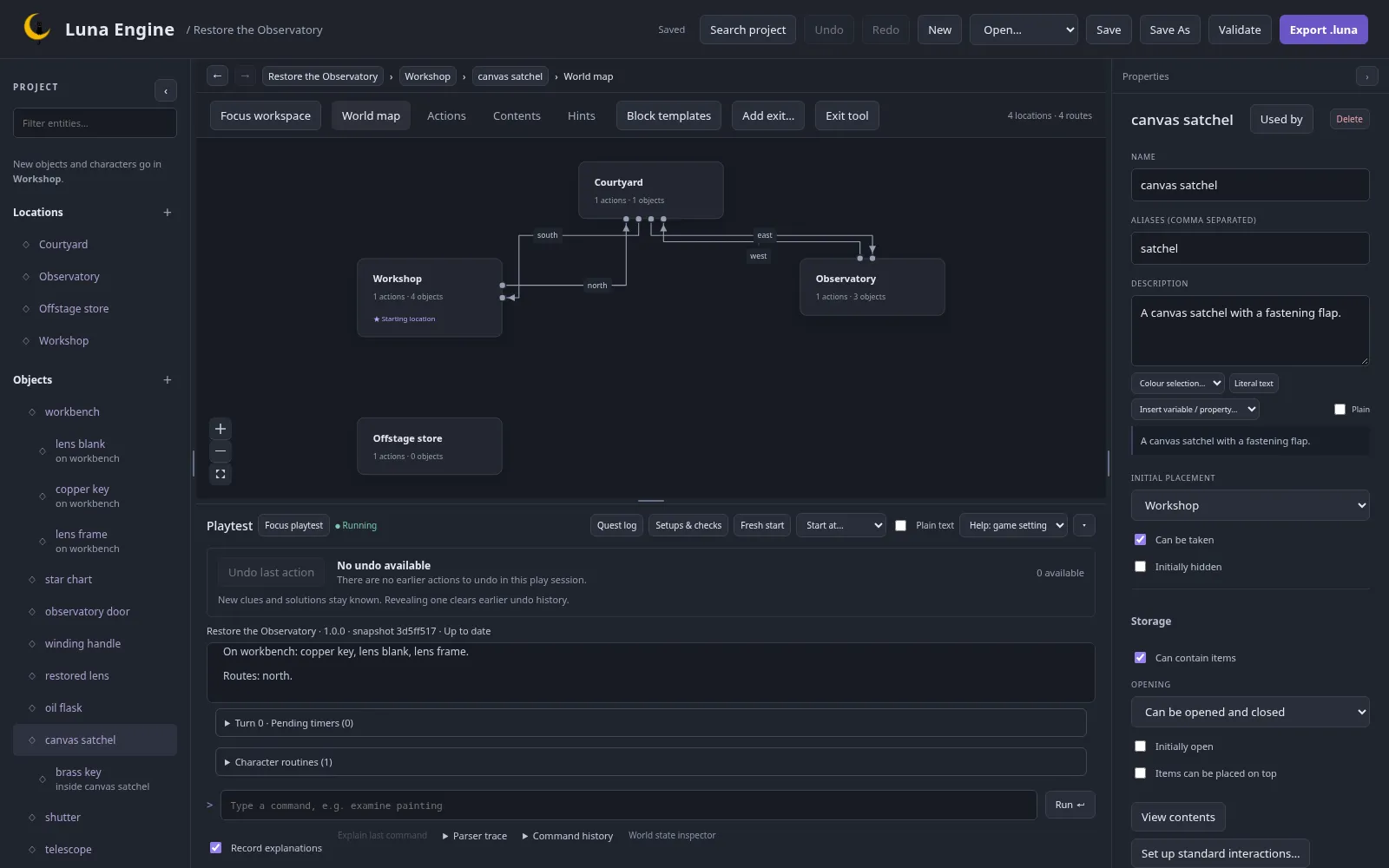
Section titled “Create a container”- Add an object, for example
canvas bag. - In Storage, enable Can contain items.
- Choose Opening: always open or openable. For openable storage, set Initially open deliberately.
- Set Can be taken if the player can carry the holder.
- Open Contents to place items inside it.
- Choose Set up standard interactions, review verbs/refusals and add the desired actions.
A surface uses Items can be placed on top. An object can have both an interior and a top surface. A closed interior can block access while items on top remain accessible.
Standard interactions
Section titled “Standard interactions”Setup creates ordinary editable actions for open/close, look inside, put an item in/on, take from, and portable take/drop as appropriate. It does not generate a separate action for every possible item.
Try:
open baglook in bagtake key from bagput key in bagclose bagThose phrases depend on the selected vocabulary. Standard setup is a starting point: customize requirements, refusals and messages. A custom exact-object action may take precedence over a generic item action; use explanations to check the selected handler.
Ownership and access
Section titled “Ownership and access”| Check | Meaning |
|---|---|
| CARRYING | Directly in the player’s inventory |
| CHARACTER CARRYING | Directly in that character’s inventory |
| POSSESSES | Owned directly or through nested holders, even closed/hidden ones |
| REACHABLE | Currently accessible through visible, open enclosing holders |
| IN OBJECT | Immediate inside/on relationship |
| CAN TRANSFER | Physical player transfer allowed, including portability/access and no cycles |
Carrying a closed bag can mean you possess its key without being able to use it. For a usable key, check appropriate possession and reachability rather than direct carrying alone.
Moving a holder preserves its nested contents. A holder cannot contain itself or an ancestor. Removing/consuming holders also needs deliberate handling of their contents; inspect the resulting state.
Scripted or physical transfer?
Section titled “Scripted or physical transfer?”PUT OBJECT is scripted placement. It preserves graph/capability invariants but can stage items in closed or offstage storage. Pair it with CAN TRANSFER when implementing player physical interactions.
The Command item input refers to the item matched by this action. Use the name insertion menu for item/holder names in its message. This input exists only in its supported command scope; a timer or trigger does not remember an earlier command’s item.
Before removing a storage capability, review affected contents/actions/references in the impact dialog. Do not leave items assigned to an unsupported interior or surface.
Explore the separate Packing the Study project for nesting and edge cases.