Home
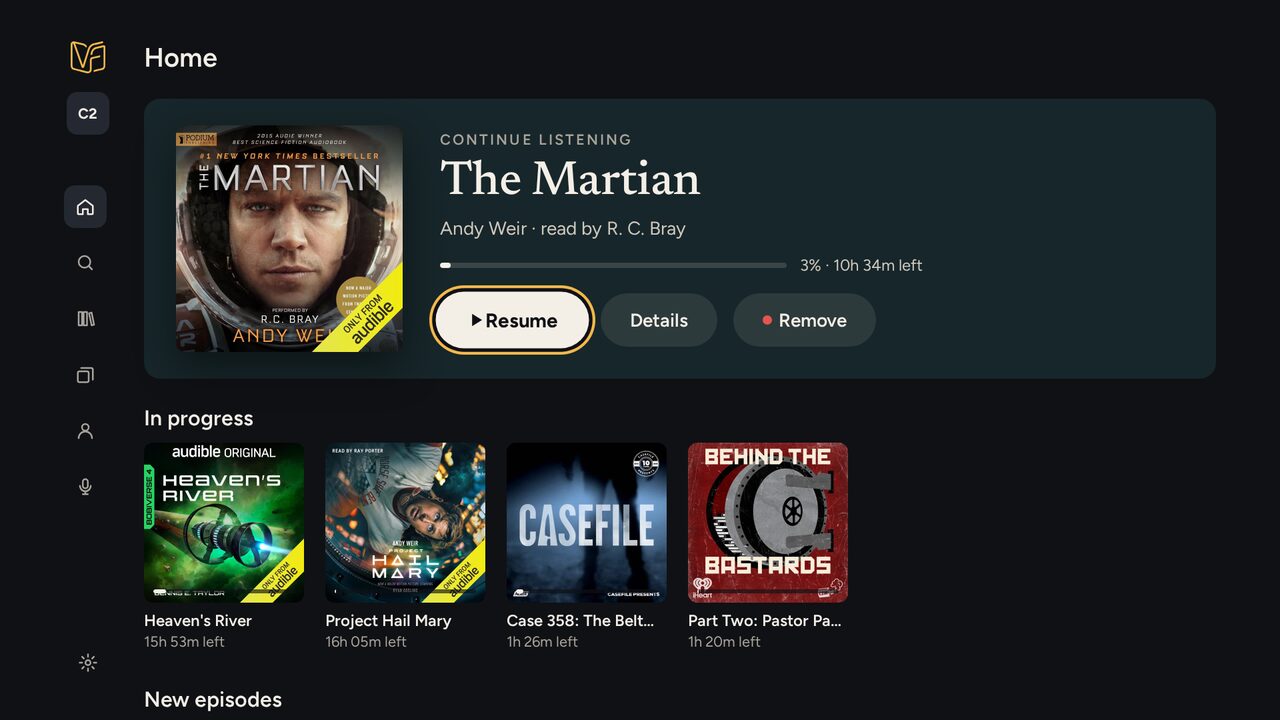
The large card at the top is the book or episode you played most recently. Resume carries on from where you stopped, on any device. When it’s already loaded, the button reads Back to player.
Below it are rows you can choose and order yourself:
| Row | Shows |
|---|---|
| In progress | Everything else you’re partway through, books and podcast episodes together |
| New episodes ★ | The latest episodes from your podcasts |
| Continue series | The next book in each series you’ve started |
| Recently added | New to the library |
| Discover | Books you haven’t started, picked at random |
| Listen again | Books you finished a while ago (hidden at first) |
| New series | Series added to the library lately (hidden at first) |
Choose Home rows at the bottom of Home opens the settings for this. Each row can be shown or hidden, and Channel up and down move the focused row. See Settings.
Once you scroll down past the main card, its book stays at the top of the screen as a small ▶ title · N% button, so it’s one press of Up away.
Taking something off Continue listening
To take an item off Home without finishing it, press Red on its tile in In progress, or choose Remove on the main card. For a few seconds after, Red puts it back. Listening to it again brings it back too.
Up to date on its own
Home opens instantly from a saved copy, then refreshes. When you listen on another device, Home updates its progress bars and cards while you watch. It never swaps the main card while you’re on it.
Year in Review ★
From 1 December to 15 January, Home offers your year in listening. See your year opens it, and Later asks again in a week. See Stats.