Finding something to listen to
The side rail holds Home, Search, Library, Series, Authors, Podcasts ★ and Settings. Press Left from anywhere on a screen to reach it.
Library
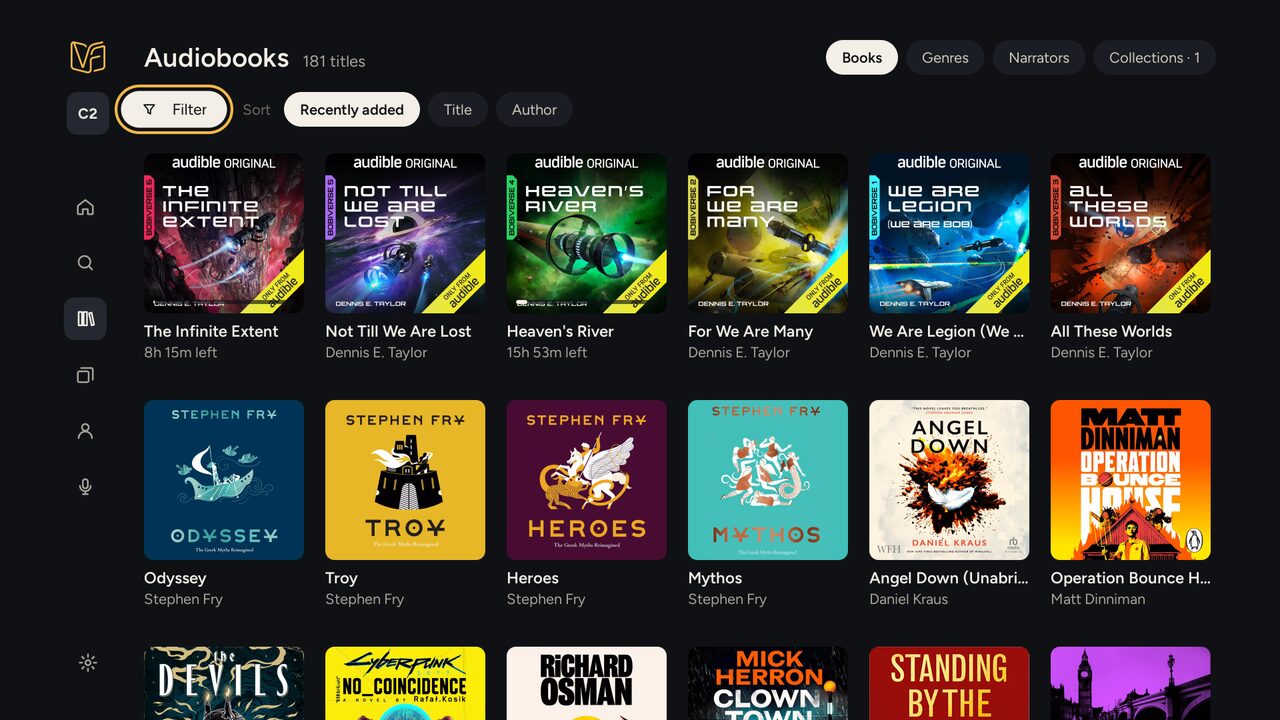
Every book in the library, as covers. Sort by Recently added, Title or Author. With more than one book library, the library name at the top switches between them.
The tabs at the top right switch how the library is laid out:
- Books: every book. Filter and Sort sit on the line below the title.
- Genres: a shelf for each genre, the biggest first. The last tile on a long shelf, All N, opens every book in that genre.
- Narrators: everyone who reads in the library, as portraits from A to Z. Channel up and down jump to the next or previous letter, shown on the right. OK opens their books.
- Collections: the server’s collections and playlists, when there are any.
The genre and narrator views work for libraries of up to 2,000 books.
Filter narrows the list by a progress state, by one genre, narrator, tag or language, or by one of each together:
- Progress: not started, in progress or finished
- Genre, Narrator, Tag, Language: from your server’s own data
Each choice shows how many books it would return. Choices stay in the panel as you pick, so you can add a second one, and a dot marks each tab with something chosen. In long lists, Left and Right jump to the next or previous letter and Channel up and down move a page.
Genres that a metadata source joined into one long string are split into separate genres, and different spellings of a language are merged. While a filter is on, the chip shows it and the count reads, for example, “7 of 181 titles”. Red on the chip, or in the filter panel, shows all books again. In long lists such as narrators, Channel up and down jump eight at a time.
Back from a book or a narrator returns to the same place in the view.
A book’s page
Opening a book shows its details, series and authors. From here you can play, start over, or mark it finished or unfinished. For a book in a series, the page shows the next book and a switch for Autoplay.
Series and authors
Series lists every series with its books in order and your progress through them. Authors lists everyone with books in the library. An author’s page groups their books by series.
Search
Search finds books by title, author, narrator or series, and podcast shows and episodes. Type with the TV keyboard or use the remote’s voice button. When both books and podcasts match, chips at the top switch between All, Audiobooks and Podcasts.